
How I Integrated @google/genai (Latest) with Gemini Models in a Node.js Express Application
RA
Rafly Aziz Abdillah
16 menit baca
The Journey Begins
So here's the thing. I've always been fascinated by AI, but most tutorials I found were either way too simple or unnecessarily complex. I wanted to build something real, something that could actually be used in production. That's when I decided to dive deep into Google's Gemini AI using their latest @google/genai package.
What started as a weekend experiment turned into a full-fledged project that ended up winning multiple competitions. But this isn't about the wins. It's about the journey of building something clean, scalable, and genuinely useful.
What I Actually Built
I created a production-ready Express.js application with TypeScript that properly integrates with Google's Gemini models. Not just a proof of concept, but something with proper architecture, error handling, and real-world features that developers can actually learn from and build upon.
Full source code: https://github.com/raflytch/google-gen-ai-nodejs-example
The application does two main things:
- Text Generation - Send a text prompt and get intelligent AI responses
- Vision Analysis - Upload an image with a prompt and let Gemini analyze it
Simple on the surface, but there's a lot going on under the hood.
The Architecture
I spent a good amount of time thinking about how to structure this. I wanted it to be maintainable and scalable, not just a bunch of code thrown into one file. Here's what I came up with:
text
src/
├── config/
│   ├── config.interface.ts
│   └── config.ts
├── controllers/
│   └── ai/
│       └── ai.controller.ts
├── libs/
│   └── genai/
│       ├── genai.client.ts
│       └── genai.interface.ts
├── middlewares/
│   └── upload.middleware.ts
├── routes/
│   ├── ai.routes.ts
│   └── routes.ts
├── services/
│   └── ai/
│       ├── ai.interface.ts
│       └── ai.service.ts
└── app.ts
Each layer has a specific purpose. Controllers handle HTTP stuff, services contain business logic, and the libs folder has the reusable GenAI client.
Getting Started
Let's start from scratch:
bash
npm init -y
npm install @google/genai dotenv express multer
npm install -D @types/express @types/multer @types/node ts-node-dev typescript
Environment Setup
Create a .env file:
env
GOOGLE_GENAI_API_KEY=your_api_key
PORT=3000
NODE_ENV=development
Get your API key from Google AI Studio.
TypeScript Configuration
Create your tsconfig.json:
json
{
  "compilerOptions": {
    "target": "ES2022",
    "module": "CommonJS",
    "lib": ["ES2022"],
    "outDir": "./dist",
    "rootDir": "./src",
    "strict": true,
    "esModuleInterop": true,
    "skipLibCheck": true,
    "forceConsistentCasingInFileNames": true,
    "resolveJsonModule": true,
    "declaration": true,
    "declarationMap": true,
    "sourceMap": true,
    "moduleResolution": "node"
  },
  "include": ["src/**/*"],
  "exclude": ["node_modules", "dist"]
}
Configuration Layer
First, let's set up our configuration. Create src/config/config.interface.ts:
typescript
export interface AppConfig {
  port: number;
  nodeEnv: string;
}

export interface GenAIConfig {
  apiKey: string;
  model: string;
}

export interface Config {
  app: AppConfig;
  genai: GenAIConfig;
}
Then src/config/config.ts:
typescript
import dotenv from "dotenv";
import { Config } from "./config.interface";

dotenv.config();

export const config: Config = {
  app: {
    port: parseInt(process.env.PORT || "3000", 10),
    nodeEnv: process.env.NODE_ENV || "development",
  },
  genai: {
    apiKey: process.env.GOOGLE_GENAI_API_KEY || "",
    model: "gemini-2.5-flash",
  },
};
GenAI Library
This is the core of the application. Create src/libs/genai/genai.interface.ts:
typescript
export interface TextGenerationRequest {
  prompt: string;
}

export interface ImageGenerationRequest {
  prompt: string;
  imageBuffer: Buffer;
  mimeType: string;
}

export interface GenerationResponse {
  success: boolean;
  data: string | null;
  error: string | null;
}
Now the main client src/libs/genai/genai.client.ts:
typescript
import { GoogleGenAI } from "@google/genai";
import { config } from "../../config/config";
import { GenerationResponse, ImageGenerationRequest, TextGenerationRequest } from "./genai.interface";

export class GenAIClient {
  private readonly client: GoogleGenAI;
  private readonly model: string;

  constructor() {
    if (!config.genai.apiKey) {
      throw new Error("GOOGLE_GENAI_API_KEY is not configured");
    }
    this.client = new GoogleGenAI({ apiKey: config.genai.apiKey });
    this.model = config.genai.model;
  }

  async generateText(request: TextGenerationRequest): Promise<GenerationResponse> {
    try {
      const response = await this.client.models.generateContent({
        model: this.model,
        contents: request.prompt,
      });
      return { success: true, data: response.text || null, error: null };
    } catch (error) {
      const errorMessage = error instanceof Error ? error.message : "Unknown error occurred";
      return { success: false, data: null, error: errorMessage };
    }
  }

  async generateFromImage(request: ImageGenerationRequest): Promise<GenerationResponse> {
    try {
      const base64Image = request.imageBuffer.toString("base64");
      const response = await this.client.models.generateContent({
        model: this.model,
        contents: [
          {
            role: "user",
            parts: [
              { inlineData: { mimeType: request.mimeType, data: base64Image } },
              { text: request.prompt },
            ],
          },
        ],
      });
      return { success: true, data: response.text || null, error: null };
    } catch (error) {
      const errorMessage = error instanceof Error ? error.message : "Unknown error occurred";
      return { success: false, data: null, error: errorMessage };
    }
  }
}

let genaiClientInstance: GenAIClient | null = null;

export const getGenAIClient = (): GenAIClient => {
  if (!genaiClientInstance) {
    genaiClientInstance = new GenAIClient();
  }
  return genaiClientInstance;
};
Service Layer
Create src/services/ai/ai.interface.ts:
typescript
import { GenerationResponse } from "../../libs/genai/genai.interface";

export interface IAIService {
  generateText(prompt: string): Promise<GenerationResponse>;
  generateFromImage(prompt: string, imageBuffer: Buffer, mimeType: string): Promise<GenerationResponse>;
}
And src/services/ai/ai.service.ts:
typescript
import { getGenAIClient } from "../../libs/genai/genai.client";
import { GenerationResponse } from "../../libs/genai/genai.interface";
import { IAIService } from "./ai.interface";

export class AIService implements IAIService {
  private readonly genaiClient = getGenAIClient();

  async generateText(prompt: string): Promise<GenerationResponse> {
    if (!prompt || prompt.trim().length === 0) {
      return { success: false, data: null, error: "Prompt is required" };
    }
    return this.genaiClient.generateText({ prompt });
  }

  async generateFromImage(prompt: string, imageBuffer: Buffer, mimeType: string): Promise<GenerationResponse> {
    if (!prompt || prompt.trim().length === 0) {
      return { success: false, data: null, error: "Prompt is required" };
    }
    if (!imageBuffer || imageBuffer.length === 0) {
      return { success: false, data: null, error: "Image buffer is required" };
    }
    return this.genaiClient.generateFromImage({ prompt, imageBuffer, mimeType });
  }
}
Middleware
Create src/middlewares/upload.middleware.ts:
typescript
import multer from "multer";

const storage = multer.memoryStorage();

const fileFilter = (
  _req: Express.Request,
  file: Express.Multer.File,
  cb: multer.FileFilterCallback
): void => {
  const allowedMimes = ["image/jpeg", "image/png", "image/gif", "image/webp"];
  if (allowedMimes.includes(file.mimetype)) {
    cb(null, true);
  } else {
    cb(new Error("Invalid file type. Only JPEG, PNG, GIF, and WebP are allowed."));
  }
};

export const upload = multer({
  storage,
  fileFilter,
  limits: { fileSize: 10 * 1024 * 1024 },
});
Controller
Create src/controllers/ai/ai.controller.ts:
typescript
import { Request, Response } from "express";
import { AIService } from "../../services/ai/ai.service";

export class AIController {
  private readonly aiService: AIService;

  constructor() {
    this.aiService = new AIService();
  }

  generateText = async (req: Request, res: Response): Promise<void> => {
    try {
      const { prompt } = req.body as { prompt: string };
      const result = await this.aiService.generateText(prompt);
      if (!result.success) {
        res.status(400).json(result);
        return;
      }
      res.json(result);
    } catch (error) {
      const errorMessage = error instanceof Error ? error.message : "Internal server error";
      res.status(500).json({ success: false, data: null, error: errorMessage });
    }
  };

  generateFromImage = async (req: Request, res: Response): Promise<void> => {
    try {
      const { prompt } = req.body as { prompt: string };
      const file = req.file;
      if (!file) {
        res.status(400).json({ success: false, data: null, error: "Image file is required" });
        return;
      }
      const result = await this.aiService.generateFromImage(prompt, file.buffer, file.mimetype);
      if (!result.success) {
        res.status(400).json(result);
        return;
      }
      res.json(result);
    } catch (error) {
      const errorMessage = error instanceof Error ? error.message : "Internal server error";
      res.status(500).json({ success: false, data: null, error: errorMessage });
    }
  };
}
Routes
Create src/routes/ai.routes.ts:
typescript
import { Router } from "express";
import { AIController } from "../controllers/ai/ai.controller";
import { upload } from "../middlewares/upload.middleware";

const router = Router();
const aiController = new AIController();

router.post("/text", aiController.generateText);
router.post("/image", upload.single("image"), aiController.generateFromImage);

export default router;
And src/routes/routes.ts:
typescript
import { Router } from "express";
import aiRoutes from "./ai.routes";

const router = Router();
router.use("/ai", aiRoutes);

export default router;
Main Application
Finally, src/app.ts:
typescript
import express, { Application, Request, Response } from "express";
import { config } from "./config/config";
import router from "./routes/routes";

const app: Application = express();

app.use(express.json());
app.use(express.urlencoded({ extended: true }));

app.get("/health", (_req: Request, res: Response) => {
  res.json({ status: "ok", timestamp: new Date().toISOString() });
});

app.use("/api", router);

app.use((_req: Request, res: Response) => {
  res.status(404).json({ success: false, data: null, error: "Route not found" });
});

app.listen(config.app.port, () => {
  console.log(`Server running on http://localhost:${config.app.port}`);
});

export default app;
Running the Project
bash
npm run devUsing the API
Health Check
text
GET http://localhost:3000/healthGenerate Text
text
POST http://localhost:3000/api/ai/text
Content-Type: application/json

{ "prompt": "Explain async/await in JavaScript" }
Analyze Image
text
POST http://localhost:3000/api/ai/image
Content-Type: multipart/form-data

prompt: "Describe this image"
image: [file]
Real Results
Text Generation Example:
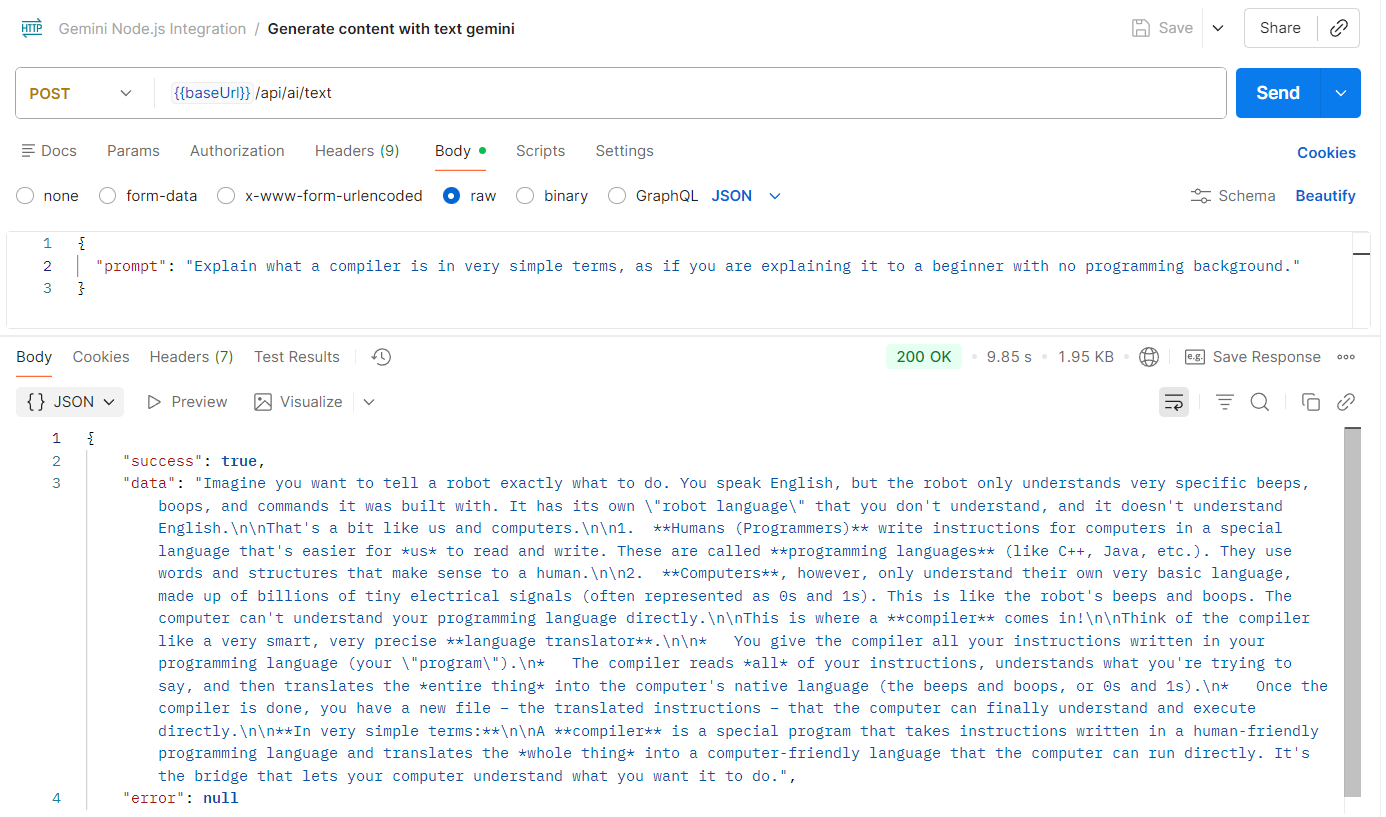 Text Generation Result
Image Analysis Example:
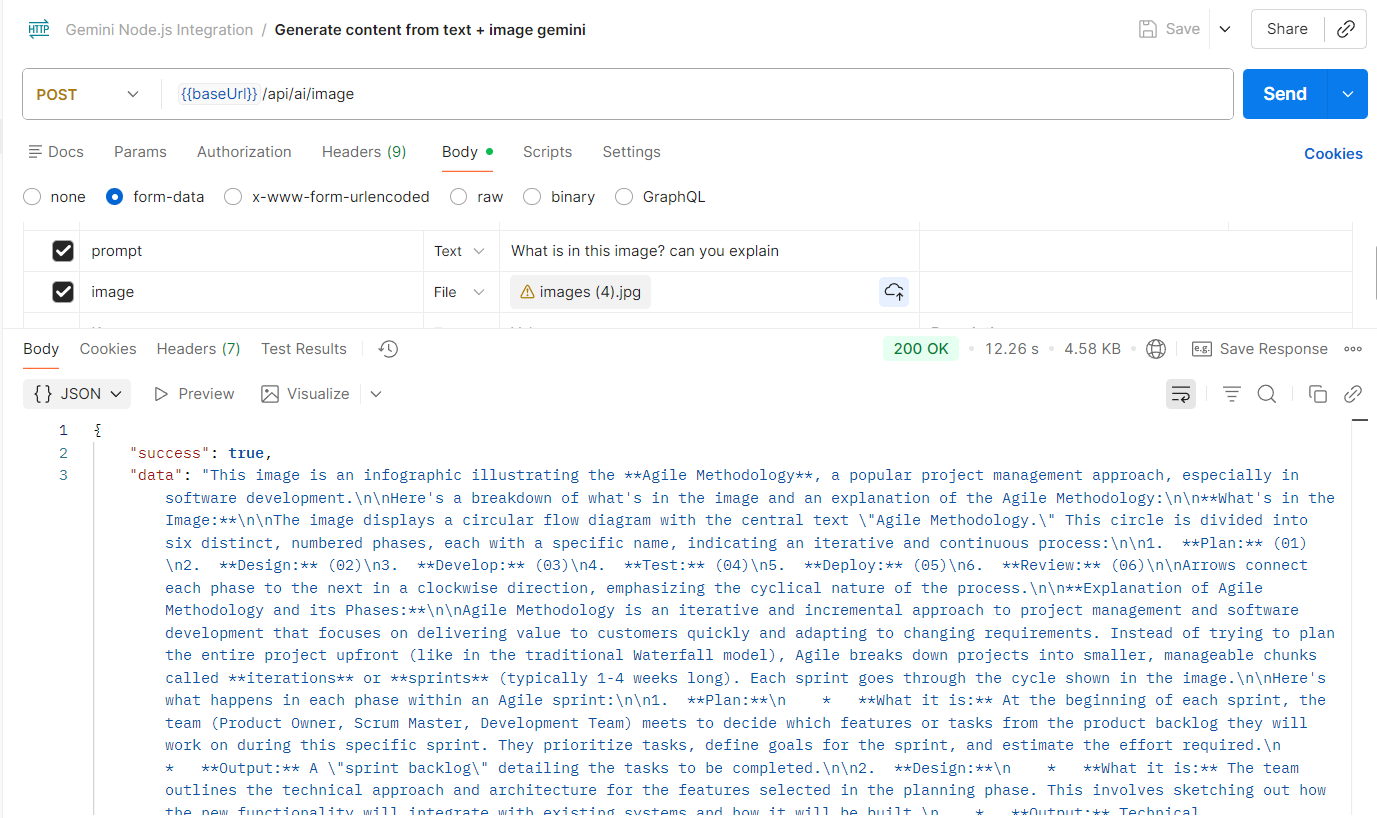 Image Analysis Result
Competition Success
I submitted this to a few competitions and it did well. The clean architecture and practical implementation made it stand out. Judges appreciated that it wasn't just another tutorial project - it was something you could actually deploy and use.
What I Learned
Start with architecture: Planning upfront saves hours of refactoring later.
TypeScript is worth it: Catching type errors at compile time instead of runtime is invaluable.
Error handling matters: Consistent error responses make debugging easier for everyone.
Keep it simple: The singleton pattern works perfectly here. No need for complex patterns when simple solutions do the job.
Resources
Source Code: https://github.com/raflytch/google-gen-ai-nodejs-example
Official Documentation: https://googleapis.github.io/js-genai/
Gemini API Docs: https://ai.google.dev/docs
Wrapping Up
The best code isn't the most clever or complex. It's code that's easy to understand, maintain, and actually solves a real problem. Feel free to clone the repo, break things, improve things, and make it your own.
Happy coding!
Komentar(0)