
A Practical Guide to Redis Caching in Node.js Applications
RA
Rafly Aziz Abdillah
37 menit baca
What is Redis?
Redis (which stands for Remote Dictionary Server) is an open-source, in-memory data structure store. It is primarily used as a fast, highly scalable key-value database, a cache, a message broker, and a streaming engine.
Unlike traditional relational databases (like MySQL or PostgreSQL) that store data on hard drives or SSDs, Redis stores all of its data directly in the server's main memory (RAM). This architectural choice allows it to deliver incredibly fast, sub-millisecond response times because it eliminates the need to access slower disk storage.
TL;DR: Redis is your database's best friend. It handles the heavy lifting so your primary database can chill.
Key Characteristics
| Feature | What It Means |
|---|---|
| In-Memory Performance | Data lives in RAM, so reads and writes are insanely fast (millions of ops/sec) |
| Key-Value Architecture | Access data via unique keys, but values can be complex data structures |
| Persistence Options | Can snapshot data to disk so you don't lose everything on a crash |
| High Availability | Redis Sentinel (auto-failover) + Redis Cluster (distributed data) |
Common Data Structures
Redis isn't just a boring key-value store — it supports a ton of built-in data structures out of the box:
- Strings — The most basic type. Store text, numbers, or serialized objects.
- Lists — Collections of string elements sorted by insertion order. Perfect for queues.
- Sets — Unordered collections of unique strings. Great for tracking unique visitors.
- Hashes — Maps composed of fields and values (similar to objects or dictionaries in programming languages). Ideal for storing user profiles.
- Sorted Sets — Like Sets, but every string is associated with a score, allowing elements to be sorted automatically. Perfect for leaderboards.
Primary Use Cases
Here are the top real-world scenarios where Redis absolutely shines:
- Caching — Storing the results of frequent database queries or API calls so that subsequent requests can be served instantly without overloading the primary database.
- Session Management — Holding user login sessions and tokens for fast verification in web applications.
- Real-Time Analytics — Counting and processing fast-moving data streams, such as tracking website traffic or monitoring system metrics in real-time.
- Gaming Leaderboards — Using Sorted Sets to instantly calculate and retrieve a player's global rank.
- Pub/Sub Messaging — Acting as a lightweight message broker where publishers send messages to channels, and subscribers listen for those messages in real-time (useful for chat applications).
Before vs. After Redis
Let's visualize what happens when you add Redis to your architecture:
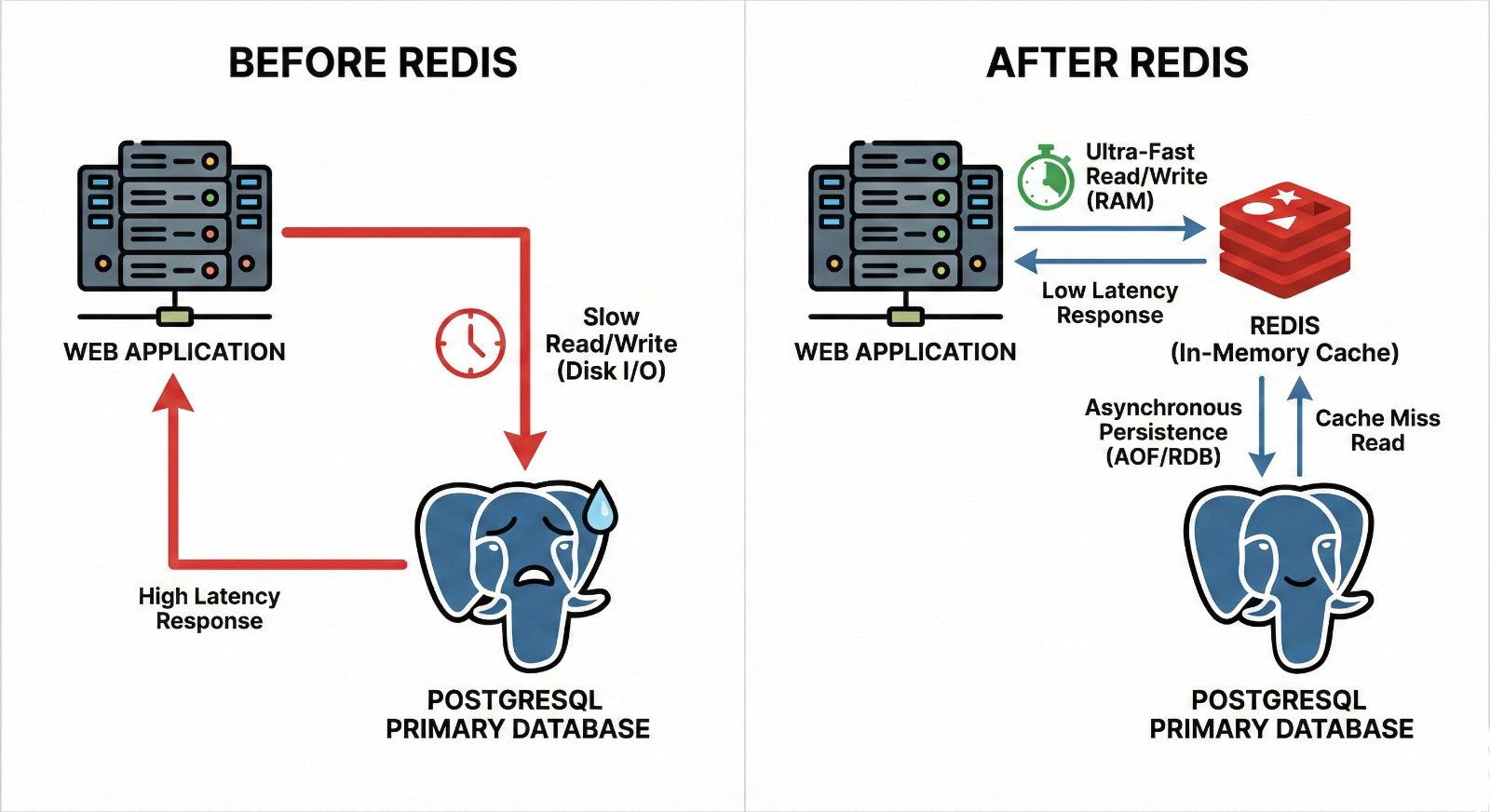 Redis Workflow Diagram
Before Redis
This side illustrates a standard architecture where the web application relies solely on PostgreSQL for all data operations.
- Direct Disk I/O — Every time a user makes a request, the web application queries PostgreSQL directly. Because PostgreSQL stores its data on a physical disk (Hard Drive or SSD), it has to perform Disk I/O operations, which are significantly slower than reading from memory.
- High Latency — The delay caused by waiting for the disk to find and return the data results in a high latency response for the user.
- Database Strain — Processing every single query, especially repetitive reads, consumes CPU and memory resources, eventually causing a bottleneck as traffic increases.
After Redis
This side shows how adding Redis dramatically improves performance and relieves the PostgreSQL database.
- In-Memory Speed (RAM) — Redis is placed between the web application and PostgreSQL. When the app needs data, it checks Redis first. Because Redis stores data in RAM, it provides ultra-fast read and write speeds.
- Low Latency — Retrieving data from RAM eliminates the slow Disk I/O, resulting in a low latency response that feels instantaneous to the user.
- Cache Miss and Sync — If Redis doesn't have the data (a "Cache Miss"), the system will fetch it from PostgreSQL and then store it in Redis for next time. Data writes or cache updates can be handled via asynchronous persistence in the background without slowing down the user's experience.
- A Happy Database — By letting Redis handle the bulk of the repetitive read requests, PostgreSQL is protected from being overwhelmed. PostgreSQL now has plenty of resources freed up to handle complex queries and essential data writes efficiently.
Real Performance Numbers
Don't just take my word for it — check out the actual response times from our implementation:
Before Redis (Direct PostgreSQL)
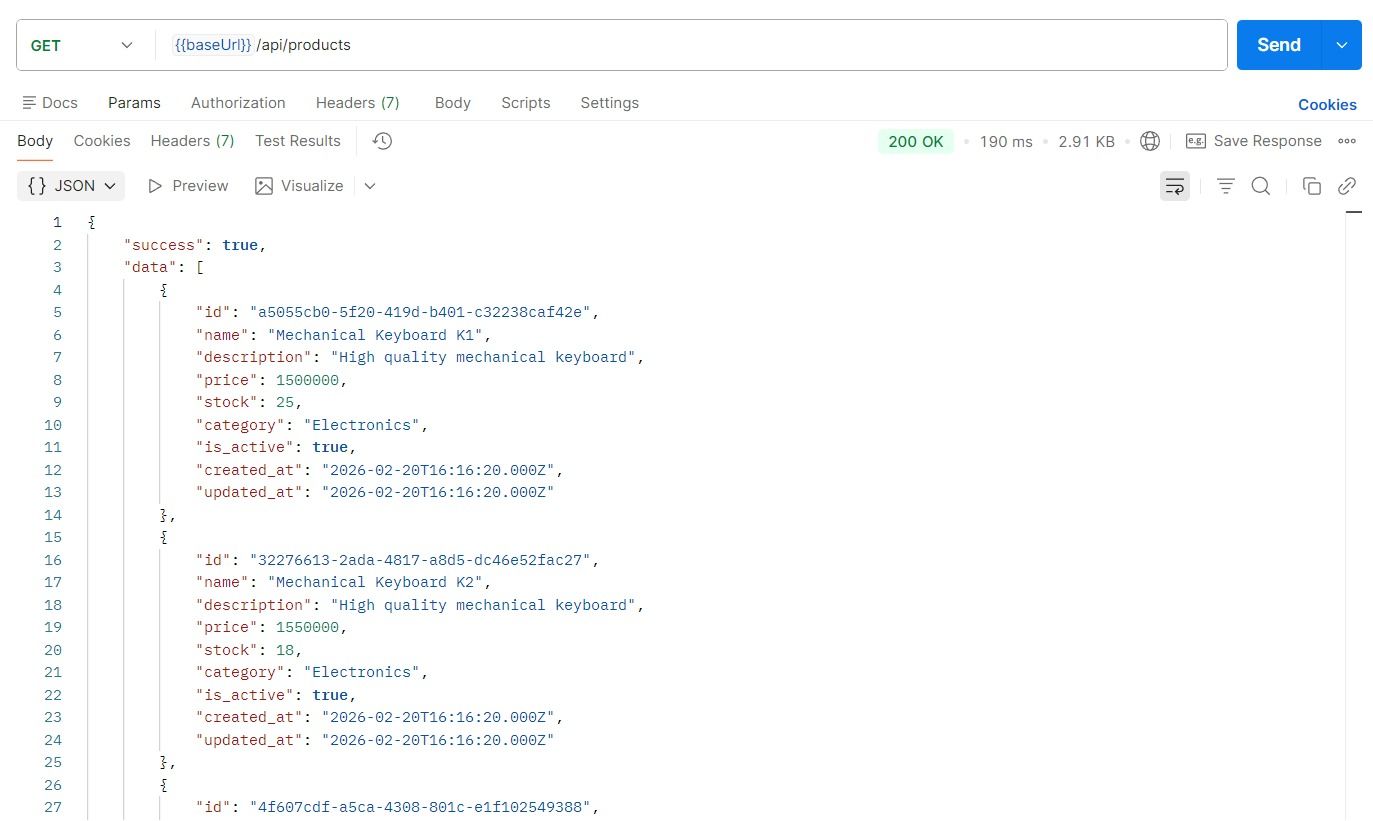 Before Redis - 190ms
190ms response time — hitting the database directly every single time.
After Redis (With Caching)
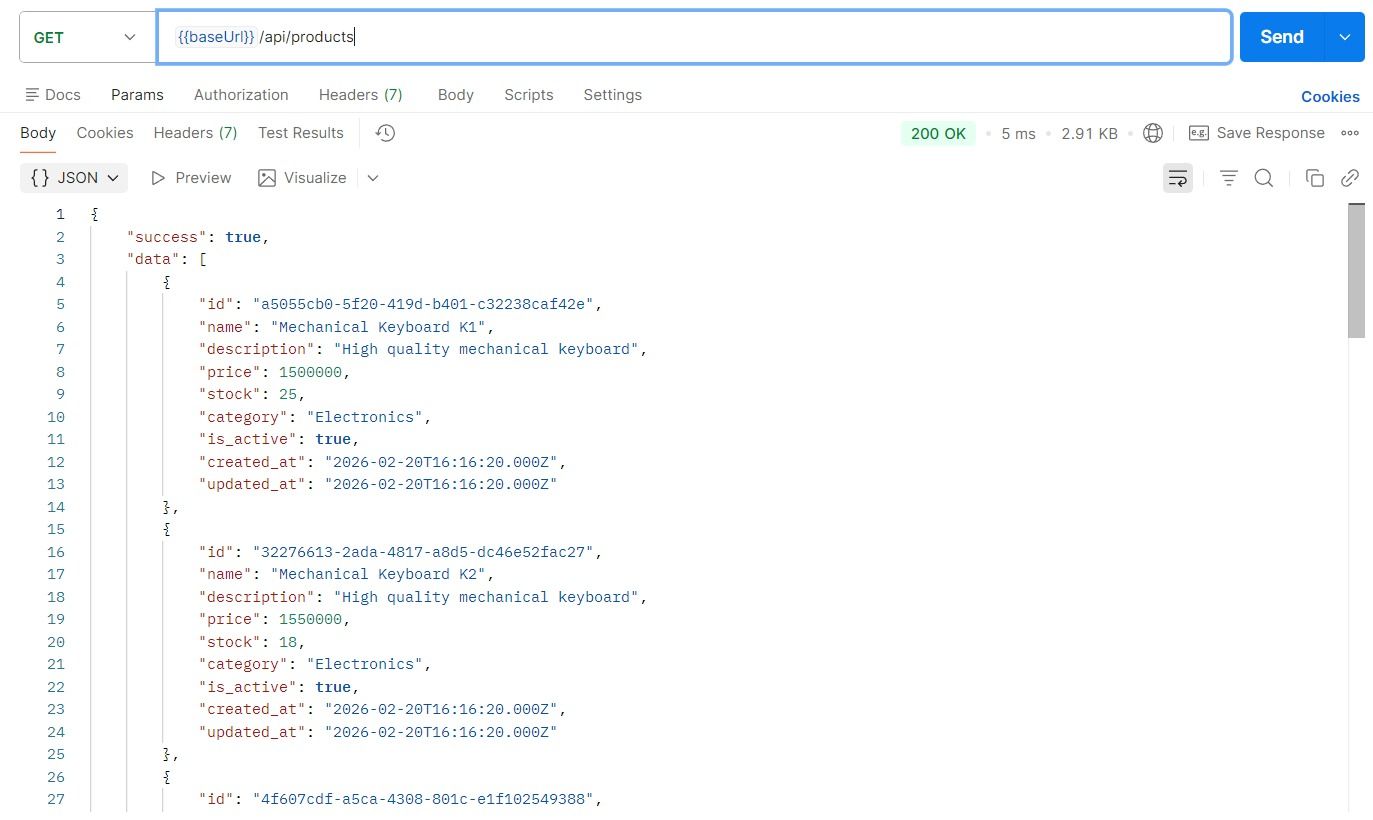 After Redis - 5ms
5ms response time — that's a 38x speed improvement. The data is served straight from Redis's memory cache.
That's the difference between "meh" and "woah". From 190ms to 5ms — and all it takes is a caching layer.
Implementation in Express.js Application
Alright, enough theory. Let's build a Product API that integrates Redis as a caching layer using the Service-Repository Pattern for clean, SOLID architecture.
Project Structure
text
src/
├── config/
│   ├── database.config.ts
│   ├── env.config.ts
│   └── redis.config.ts
├── controllers/
│   └── product.controller.ts
├── middlewares/
│   ├── error.middleware.ts
│   └── validation.middleware.ts
├── models/
│   └── product.model.ts
├── repositories/
│   ├── product.repository.interface.ts
│   └── product.repository.ts
├── routes/
│   └── product.routes.ts
├── services/
│   ├── product.service.interface.ts
│   └── product.service.ts
├── app.ts
└── server.ts
This follows a clean architecture approach — each layer has a single responsibility, and dependencies flow inward through interfaces. This makes the codebase testable, maintainable, and easy to extend.
Environment Configuration
First, let's handle our environment variables. This centralized config makes it super clean to access settings across the entire app.
src/config/env.config.ts
typescript
import dotenv from "dotenv";

dotenv.config();

export const envConfig = {
  port: parseInt(process.env.PORT || "3000", 10),
  nodeEnv: process.env.NODE_ENV || "development",
  db: {
    host: process.env.DB_HOST || "localhost",
    port: parseInt(process.env.DB_PORT || "5432", 10),
    user: process.env.DB_USER || "postgres",
    password: process.env.DB_PASSWORD || "postgres",
    name: process.env.DB_NAME || "redis_demo",
  },
  redis: {
    host: process.env.REDIS_HOST || "localhost",
    port: parseInt(process.env.REDIS_PORT || "6379", 10),
    password: process.env.REDIS_PASSWORD || undefined,
    ttl: parseInt(process.env.REDIS_TTL || "3600", 10),
  },
} as const;
Why
as const? This tells TypeScript to make the object deeply readonly. No accidental mutations allowed — your config is locked down tight.
Database Configuration
src/config/database.config.ts
typescript
import { Pool, PoolConfig } from "pg";
import { envConfig } from "./env.config";

const poolConfig: PoolConfig = {
  host: envConfig.db.host,
  port: envConfig.db.port,
  user: envConfig.db.user,
  password: envConfig.db.password,
  database: envConfig.db.name,
  max: 20,
  idleTimeoutMillis: 30000,
  connectionTimeoutMillis: 5000,
};

export const pool = new Pool(poolConfig);

export const connectDatabase = async (): Promise<void> => {
  try {
    const client = await pool.connect();
    console.log("PostgreSQL connected successfully");
    client.release();
  } catch (error) {
    console.error("PostgreSQL connection failed:", error);
    process.exit(1);
  }
};
Connection Pooling — We're not creating a new connection for every query. We maintain a pool of 20 reusable connections (
max: 20). When a query finishes, the connection goes back to the pool instead of being destroyed. This is way more efficient and prevents your database from being flooded with connections.
Redis Configuration
This is where the magic begins. This file sets up the Redis client that will power our caching layer.
src/config/redis.config.ts
typescript
import Redis from "ioredis";
import { envConfig } from "./env.config";

export const redisClient = new Redis({
  host: envConfig.redis.host,
  port: envConfig.redis.port,
  password: envConfig.redis.password,
  retryStrategy: (times: number): number => {
    return Math.min(times * 50, 2000);
  },
  maxRetriesPerRequest: 3,
});

export const connectRedis = async (): Promise<void> => {
  try {
    await redisClient.ping();
    console.log("Redis connected successfully");
  } catch (error) {
    console.error("Redis connection failed:", error);
    process.exit(1);
  }
};
Let's break this down:
ioredis— We're usingioredisinstead of the officialredispackage because it's more feature-rich, has built-in cluster support, and the API is just cleaner overall.retryStrategy— If Redis goes down, we don't just crash. Instead, we wait and retry with exponential backoff (50ms, 100ms, 150ms... capped at 2000ms). This gives Redis time to come back without killing your app.maxRetriesPerRequest: 3— Each individual request gets 3 retry attempts before giving up. This prevents a single failed request from hanging forever.ping()— We verify the connection is alive by sending aPINGcommand. If Redis responds withPONG, we're good to go.
Product Model
src/models/product.model.ts
typescript
export interface Product {
  id: string;
  name: string;
  description: string | null;
  price: number;
  stock: number;
  category: string | null;
  is_active: boolean;
  created_at: Date;
  updated_at: Date;
}

export interface ProductQueryParams {
  page?: number;
  limit?: number;
  category?: string;
  is_active?: boolean;
  search?: string;
  sort_by?: "name" | "price" | "created_at" | "stock";
  sort_order?: "ASC" | "DESC";
}

export interface PaginatedResponse<T> {
  data: T[];
  pagination: {
    page: number;
    limit: number;
    total: number;
    total_pages: number;
  };
}
Generic
PaginatedResponse<T>— This isn't just for products. By making it generic, you can reuse this exact interface for ANY paginated response in your app. Orders, Users, Categories — all covered with one interface. That's the beauty of TypeScript generics.
Repository Layer — Database Access
The repository layer handles all direct communication with PostgreSQL. The service layer doesn't know or care about SQL queries — it just calls repository methods.
src/repositories/product.repository.interface.ts
typescript
import { Product, ProductQueryParams } from "../models/product.model";

export interface IProductRepository {
  findAll(params: ProductQueryParams): Promise<[Product[], number]>;
  findById(id: string): Promise<Product | null>;
}
Why an interface? This is the Dependency Inversion Principle (the "D" in SOLID) in action. The service depends on an abstraction (the interface), not a concrete implementation. Want to swap PostgreSQL for MongoDB? Just create a new class that implements
IProductRepository. Zero changes needed in the service layer.
src/repositories/product.repository.ts
typescript
import { Pool } from "pg";
import { IProductRepository } from "./product.repository.interface";
import { Product, ProductQueryParams } from "../models/product.model";

const ALLOWED_SORT_COLUMNS: Record<string, string> = {
  name: "name",
  price: "price",
  created_at: "created_at",
  stock: "stock",
};

export class ProductRepository implements IProductRepository {
  constructor(private readonly pool: Pool) {}

  async findAll(params: ProductQueryParams): Promise<[Product[], number]> {
    const {
      page = 1,
      limit = 10,
      category,
      is_active,
      search,
      sort_by = "created_at",
      sort_order = "DESC",
    } = params;

    const conditions: string[] = [];
    const values: unknown[] = [];
    let paramIndex = 1;

    if (category !== undefined) {
      conditions.push(`category = $${paramIndex++}`);
      values.push(category);
    }

    if (is_active !== undefined) {
      conditions.push(`is_active = $${paramIndex++}`);
      values.push(is_active);
    }

    if (search) {
      conditions.push(
        `(name ILIKE $${paramIndex} OR description ILIKE $${paramIndex})`,
      );
      values.push(`%${search}%`);
      paramIndex++;
    }

    const whereClause =
      conditions.length > 0 ? `WHERE ${conditions.join(" AND ")}` : "";

    const sortColumn = ALLOWED_SORT_COLUMNS[sort_by] || "created_at";
    const sortDirection = sort_order === "ASC" ? "ASC" : "DESC";
    const offset = (page - 1) * limit;

    const countQuery = `SELECT COUNT(*) as total FROM products ${whereClause}`;
    const countResult = await this.pool.query(countQuery, values);
    const total = parseInt(countResult.rows[0].total, 10);

    const dataQuery = `
      SELECT id, name, description, price, stock, category, is_active, created_at, updated_at
      FROM products
      ${whereClause}
      ORDER BY ${sortColumn} ${sortDirection}
      LIMIT $${paramIndex++} OFFSET $${paramIndex}
    `;
    const dataValues = [...values, limit, offset];
    const dataResult = await this.pool.query(dataQuery, dataValues);

    return [this.mapRows(dataResult.rows), total];
  }

  async findById(id: string): Promise<Product | null> {
    const query = `
      SELECT id, name, description, price, stock, category, is_active, created_at, updated_at
      FROM products
      WHERE id = $1
    `;
    const result = await this.pool.query(query, [id]);

    if (result.rows.length === 0) {
      return null;
    }

    return this.mapRow(result.rows[0]);
  }

  private mapRow(row: Record<string, unknown>): Product {
    return {
      id: row.id as string,
      name: row.name as string,
      description: row.description as string | null,
      price: parseFloat(row.price as string),
      stock: row.stock as number,
      category: row.category as string | null,
      is_active: row.is_active as boolean,
      created_at: row.created_at as Date,
      updated_at: row.updated_at as Date,
    };
  }

  private mapRows(rows: Record<string, unknown>[]): Product[] {
    return rows.map((row) => this.mapRow(row));
  }
}
Some cool things happening here:
ALLOWED_SORT_COLUMNS— This is a whitelist of allowed sort columns. We're not blindly injecting user input into SQL. If someone triessort_by=DROP TABLE products, it just defaults tocreated_at. SQL injection? Not today.- Parameterized Queries (
$1,$2, etc.) — We're using PostgreSQL's built-in parameterization instead of string concatenation. This is another layer of SQL injection protection. Never, ever concatenate user input into SQL strings. ILIKE— This is PostgreSQL's case-insensitiveLIKE. So searching for "iphone" will also match "iPhone", "IPHONE", etc.mapRow()/mapRows()— These private methods transform raw database rows into properly typedProductobjects. This keeps the mapping logic centralized and DRY.
Service Layer — Business Logic + Redis Caching
This is where the real magic happens. The service layer contains all the business logic AND handles the Redis caching strategy.
src/services/product.service.interface.ts
typescript
import {
  Product,
  ProductQueryParams,
  PaginatedResponse,
} from "../models/product.model";

export interface IProductService {
  getAll(params: ProductQueryParams): Promise<PaginatedResponse<Product>>;
  getById(id: string): Promise<Product>;
}
src/services/product.service.ts
typescript
import Redis from "ioredis";
import { IProductRepository } from "../repositories/product.repository.interface";
import { IProductService } from "./product.service.interface";
import {
  Product,
  ProductQueryParams,
  PaginatedResponse,
} from "../models/product.model";
import { AppError } from "../middlewares/error.middleware";

const CACHE_PREFIX = "products";

export class ProductService implements IProductService {
  constructor(
    private readonly repository: IProductRepository,
    private readonly redis: Redis,
    private readonly cacheTtl: number,
  ) {}

  async getAll(
    params: ProductQueryParams,
  ): Promise<PaginatedResponse<Product>> {
    const cacheKey = this.buildListCacheKey(params);
    const cached =
      await this.getFromCache<PaginatedResponse<Product>>(cacheKey);

    if (cached) {
      return cached;
    }

    const [products, total] = await this.repository.findAll(params);
    const page = params.page || 1;
    const limit = params.limit || 10;

    const response: PaginatedResponse<Product> = {
      data: products,
      pagination: {
        page,
        limit,
        total,
        total_pages: Math.ceil(total / limit),
      },
    };

    await this.setCache(cacheKey, response);
    return response;
  }

  async getById(id: string): Promise<Product> {
    const cacheKey = `${CACHE_PREFIX}:${id}`;
    const cached = await this.getFromCache<Product>(cacheKey);

    if (cached) {
      return cached;
    }

    const product = await this.repository.findById(id);

    if (!product) {
      throw new AppError("Product not found", 404);
    }

    await this.setCache(cacheKey, product);
    return product;
  }

  private async getFromCache<T>(key: string): Promise<T | null> {
    try {
      const cached = await this.redis.get(key);
      return cached ? (JSON.parse(cached) as T) : null;
    } catch {
      return null;
    }
  }

  private async setCache<T>(key: string, value: T): Promise<void> {
    try {
      await this.redis.setex(key, this.cacheTtl, JSON.stringify(value));
    } catch {
      return;
    }
  }

  private buildListCacheKey(params: ProductQueryParams): string {
    const {
      page = 1,
      limit = 10,
      category = "",
      is_active,
      search = "",
      sort_by = "created_at",
      sort_order = "DESC",
    } = params;

    const activeStr = is_active !== undefined ? String(is_active) : "all";
    return `${CACHE_PREFIX}:list:p${page}:l${limit}:c${category}:a${activeStr}:s${search}:sb${sort_by}:so${sort_order}`;
  }
}
Let's break down the caching strategy here — this is the heart of the whole thing:
The Cache-Aside Pattern (Lazy Loading)
This is the most popular caching pattern, and here's how it works step by step:
text
1. Request comes in   ->  Check Redis first
2. Cache HIT?         ->  Return cached data instantly (5ms!)
3. Cache MISS?        ->  Query PostgreSQL -> Store result in Redis -> Return data
4. Next request       ->  Cache HIT! -> Lightning fast response
Smart Cache Keys
Look at how buildListCacheKey() generates unique cache keys:
text
products:list:p1:l10:c:aall:s:sbcreated_at:soDESCEach key encodes ALL the query parameters. This means page=1&limit=10 and page=2&limit=10 get completely different cache entries. No stale data leaking across different queries.
TTL (Time-To-Live)
setex() stores the data with an expiration time (TTL). After the TTL expires, Redis automatically deletes the key. This ensures your cached data eventually gets refreshed with the latest database data. The TTL is configurable via the REDIS_TTL environment variable.
Graceful Error Handling
Notice the try/catch blocks in getFromCache() and setCache(). If Redis is temporarily unavailable, the app doesn't crash. It just falls back to querying PostgreSQL directly. Redis going down should never take your entire application with it — it's a performance optimization, not a hard dependency.
Controller Layer — Handling HTTP Requests
src/controllers/product.controller.ts
typescript
import { Request, Response, NextFunction } from "express";
import { IProductService } from "../services/product.service.interface";
import { ProductQueryParams } from "../models/product.model";

export class ProductController {
  constructor(private readonly service: IProductService) {}

  getAll = async (
    req: Request,
    res: Response,
    next: NextFunction,
  ): Promise<void> => {
    try {
      const params: ProductQueryParams = {
        page: req.query.page
          ? parseInt(req.query.page as string, 10)
          : undefined,
        limit: req.query.limit
          ? parseInt(req.query.limit as string, 10)
          : undefined,
        category: req.query.category as string | undefined,
        is_active:
          req.query.is_active !== undefined
            ? req.query.is_active === "true"
            : undefined,
        search: req.query.search as string | undefined,
        sort_by: req.query.sort_by as ProductQueryParams["sort_by"],
        sort_order: req.query.sort_order as ProductQueryParams["sort_order"],
      };

      const result = await this.service.getAll(params);

      res.status(200).json({
        success: true,
        ...result,
      });
    } catch (error) {
      next(error);
    }
  };

  getById = async (
    req: Request,
    res: Response,
    next: NextFunction,
  ): Promise<void> => {
    try {
      const product = await this.service.getById(req.params.id as string);

      res.status(200).json({
        success: true,
        data: product,
      });
    } catch (error) {
      next(error);
    }
  };
}
Arrow functions for methods — Notice
getAll = async (...) => {}instead ofasync getAll(...){}. This is intentional. Arrow functions automatically bindthisto the class instance. Without this, when Express calls the handler,thiswould beundefined, andthis.servicewould throw a runtime error. Classic JavaScript gotcha.
Middleware — Error Handling and Validation
src/middlewares/error.middleware.ts
typescript
import { Request, Response, NextFunction } from "express";

export class AppError extends Error {
  constructor(
    public readonly message: string,
    public readonly statusCode: number = 500,
  ) {
    super(message);
    this.name = "AppError";
    Object.setPrototypeOf(this, AppError.prototype);
  }
}

export const errorHandler = (
  err: Error,
  _req: Request,
  res: Response,
  _next: NextFunction,
): void => {
  if (err instanceof AppError) {
    res.status(err.statusCode).json({
      success: false,
      message: err.message,
    });
    return;
  }

  console.error("Unexpected error:", err);

  res.status(500).json({
    success: false,
    message: "Internal server error",
  });
};
Custom
AppErrorclass — By extending the nativeErrorclass, we can throw errors with specific HTTP status codes. The globalerrorHandlermiddleware catches all errors, checks if they're "expected" (AppError) or unexpected, and responds accordingly. Unexpected errors always return a generic 500 message — never expose internal details to the client.
src/middlewares/validation.middleware.ts
typescript
import { Request, Response, NextFunction } from "express";
import { AppError } from "./error.middleware";

export const validateUUID = (
  req: Request,
  _res: Response,
  next: NextFunction,
): void => {
  try {
    const id = req.params.id as string;
    const uuidRegex =
      /^[0-9a-f]{8}-[0-9a-f]{4}-[0-9a-f]{4}-[0-9a-f]{4}-[0-9a-f]{12}$/i;

    if (!uuidRegex.test(id)) {
      throw new AppError("Invalid product ID format", 400);
    }

    next();
  } catch (error) {
    next(error);
  }
};
UUID Validation — Before the request even reaches the controller, this middleware validates that the
:idparameter is a proper UUID format. Bad IDs get rejected with a400 Bad Requestimmediately.
Routes
src/routes/product.routes.ts
typescript
import { Router } from "express";
import { ProductController } from "../controllers/product.controller";
import { validateUUID } from "../middlewares/validation.middleware";

export const createProductRouter = (controller: ProductController): Router => {
  const router = Router();

  router.get("/", controller.getAll);
  router.get("/:id", validateUUID, controller.getById);

  return router;
};
Clean, simple, and readable. The validateUUID middleware runs before getById, acting as a gatekeeper.
App Factory and Server Bootstrap
src/app.ts
typescript
import express, { Application, Request, Response } from "express";
import { pool } from "./config/database.config";
import { redisClient } from "./config/redis.config";
import { envConfig } from "./config/env.config";
import { ProductRepository } from "./repositories/product.repository";
import { ProductService } from "./services/product.service";
import { ProductController } from "./controllers/product.controller";
import { createProductRouter } from "./routes/product.routes";
import { errorHandler } from "./middlewares/error.middleware";

export const createApp = (): Application => {
  const app = express();

  app.use(express.json());
  app.use(express.urlencoded({ extended: true }));

  const productRepository = new ProductRepository(pool);
  const productService = new ProductService(
    productRepository,
    redisClient,
    envConfig.redis.ttl,
  );
  const productController = new ProductController(productService);

  app.use("/api/products", createProductRouter(productController));

  app.get("/api/health", (_req: Request, res: Response) => {
    res.status(200).json({
      success: true,
      message: "Server is running",
      timestamp: new Date().toISOString(),
    });
  });

  app.use((_req: Request, res: Response) => {
    res.status(404).json({
      success: false,
      message: "Route not found",
    });
  });

  app.use(errorHandler);

  return app;
};
Factory Pattern —
createApp()is a factory function. It creates and configures the Express application. This pattern is especially useful for testing — you can create a fresh app instance for each test without worrying about shared state.
Notice the Dependency Injection happening here:
text
Pool -> ProductRepository -> ProductService -> ProductController -> Router -> AppEach layer receives its dependencies through the constructor. Nothing is hardcoded.
src/server.ts
typescript
import { createApp } from "./app";
import { connectDatabase } from "./config/database.config";
import { connectRedis } from "./config/redis.config";
import { envConfig } from "./config/env.config";

const bootstrap = async (): Promise<void> => {
  try {
    await connectDatabase();
    await connectRedis();

    const app = createApp();

    app.listen(envConfig.port, () => {
      console.log(`Server running on http://localhost:${envConfig.port}`);
      console.log(`Environment: ${envConfig.nodeEnv}`);
    });
  } catch (error) {
    console.error("Failed to start server:", error);
    process.exit(1);
  }
};

bootstrap();
Bootstrap sequence: Connect to PostgreSQL, then connect to Redis, then start the HTTP server. If any connection fails, the process exits with code 1 before accepting any requests. This is a fail-fast approach — better to crash early than serve broken responses.
Environment Variables
Create a .env file at the root of your project:
env
# Application
PORT=your_port
NODE_ENV=your_node_env

# PostgreSQL
DB_HOST=your_db_host
DB_PORT=your_db_port
DB_USER=your_db_user
DB_PASSWORD=your_db_password
DB_NAME=your_db_name

# Redis
REDIS_HOST=your_redis_host
REDIS_PORT=your_redis_port
REDIS_PASSWORD=your_redis_password
REDIS_TTL=your_redis_ttl
Getting Started
bash
# Clone the repository
git clone https://github.com/raflytch/node-redis-article.git

# Install dependencies
npm install

# Set up your .env file
cp .env.example .env

# Run in development mode
npm run dev

# Build for production
npm run build

# Run production build
npm start
API Endpoints
| Method | Endpoint | Description |
|---|---|---|
GET | /api/products | Get all products (paginated, filterable, sortable) |
GET | /api/products/:id | Get a single product by UUID |
GET | /api/health | Health check endpoint |
Query Parameters for GET /api/products
| Parameter | Type | Default | Description |
|---|---|---|---|
page | number | 1 | Page number |
limit | number | 10 | Items per page |
category | string | - | Filter by category |
is_active | boolean | - | Filter by active status |
search | string | - | Search by name or description |
sort_by | string | created_at | Sort field (name, price, created_at, stock) |
sort_order | string | DESC | Sort direction (ASC, DESC) |
Key Takeaways
- Redis is a performance multiplier — From 190ms to 5ms, the numbers speak for themselves.
- Cache-Aside is your go-to pattern — Check cache first, fallback to DB, then populate cache.
- Graceful degradation matters — If Redis dies, your app should still work (just slower).
- Clean architecture pays off — Interfaces + Dependency Injection = testable, swappable, maintainable code.
- Security is non-negotiable — Parameterized queries, input validation, and sort column whitelisting protect you from nasty attacks.
Komentar(0)